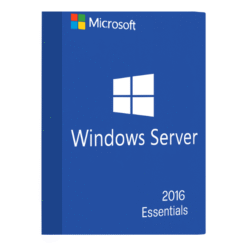
What is Windows Server Essentials 2016?
Windows Server Essentials 2016 is a powerful yet cost-effective server operating system from Microsoft, specifically designed for small businesses with up to 25 users and 50 devices. It provides essential services such as file storage, remote access, backup and recovery, and simplified server management, all in a single package. It is an ideal solution for businesses that need a robust server system but without the complexity or cost of larger enterprise-level systems.
Key Features of Windows Server Essentials 2016
Here are some of the top features that make Windows Server Essentials 2016 a great option for small businesses:
-
Simplified Management: Windows Server Essentials provides an intuitive, web-based dashboard that makes server management simple and straightforward. This centralized management console allows IT administrators to quickly handle tasks such as managing users, devices, and backups without needing extensive technical knowledge.
-
Integration with Office 365: This edition is designed to integrate smoothly with Microsoft Office 365, enabling businesses to run their productivity suite (email, calendar, document storage) in the cloud while managing on-premises server functions. The integration ensures a seamless flow of data between on-premises infrastructure and cloud applications.
Simplified Management
For small businesses with limited IT staff, the simplified management feature is a game-changer. Windows Server Essentials 2016 provides an easy-to-use dashboard for monitoring server health, managing updates, and setting up automatic backups. This allows businesses to focus on their operations rather than troubleshooting technical issues.
Integration with Office 365
By integrating with Microsoft Office 365, Windows Server Essentials 2016 ensures that businesses have the best of both worlds: the security and control of on-premises servers, combined with the flexibility and scalability of cloud solutions. This integration allows for seamless syncing between OneDrive for Business, Exchange Online, and other Office 365 services.
Why Choose Windows Server Essentials 2016?
Windows Server Essentials 2016 is designed with small businesses in mind. Here’s why it’s the best choice for organizations looking to optimize their server environment:
Ideal for Small Businesses
Windows Server Essentials 2016 is perfect for small businesses that don’t need the complexity of larger editions such as Windows Server Standard or Datacenter. It provides just the right set of features and functionality for businesses with fewer users and simpler IT needs.
Cost-Effective Solution
One of the most compelling reasons to choose Windows Server Essentials 2016 is its affordability. Unlike enterprise-level server solutions, Essentials is designed to offer essential server capabilities at a fraction of the cost. This makes it an attractive choice for businesses on a budget.
How Windows Server Essentials 2016 Supports Global Operations
Windows Server Essentials 2016 offers several features to help businesses expand globally and operate more efficiently across borders.
Multi-Language Support
Windows Server Essentials 2016 offers multi-language support, which means businesses can set up their server environment to match the language preferences of users in different regions. This feature ensures that employees in various countries can work in their native languages, improving productivity and reducing errors in communication.
Cloud Integration for Global Teams
As businesses expand globally, collaboration becomes key. With Windows Server Essentials 2016, teams can collaborate easily using the integrated cloud services. Employees working remotely or across different countries can access company resources securely through the cloud, ensuring that they are always connected and productive.
Installing Windows Server Essentials 2016
Installing Windows Server Essentials 2016 is straightforward. The following are the key steps to ensure a successful setup:
System Requirements
Before you begin installing Windows Server Essentials 2016, make sure your hardware meets the following minimum requirements:
-
Processor: 1.4 GHz 64-bit processor
-
Memory: 2 GB RAM (4 GB or more recommended)
-
Storage: 160 GB or more of hard drive space, with at least 40 GB free
-
Network: Ethernet adapter for LAN access
Installation Process
-
Prepare Installation Media: Download the installation media or use a DVD/USB stick.
-
Boot the Server: Insert the media into the server and boot from it.
-
Install Windows Server Essentials: Follow the installation wizard, select Windows Server Essentials, and proceed with the installation.
-
Complete Setup: Set up the initial configuration, such as creating an administrator account, and select whether to join an existing domain or set up a new one.
Post-Installation Setup
Once installed, you can configure essential services such as Active Directory, file sharing, and network management. You can also set up automated backups and security features to ensure your server is secure.
Managing Windows Server Essentials 2016
After installation, managing Windows Server Essentials 2016 becomes a breeze with its user-friendly interface. Here are some essential tasks for smooth management:
User and Device Management
Windows Server Essentials 2016 allows you to easily manage user accounts and devices via its web-based dashboard. You can create user accounts, manage their permissions, and track device usage from a central location.
Backup and Disaster Recovery
The server comes with built-in tools like Windows Server Backup, which makes it easy to schedule regular backups of critical business data. In case of an emergency, you can quickly restore your system and data, minimizing downtime.
Pricing and Licensing for Windows Server Essentials 2016
Windows Server Essentials 2016 offers a cost-effective solution for small businesses. It is typically sold based on the number of users or devices that need access to the server, with up to 25 users and 50 devices supported.
Why SoftLicenseKey Offers the Best Prices
When it comes to purchasing Windows Server Essentials 2016, SoftLicenseKey.com is your go-to source. We offer genuine Microsoft product keys at the best prices. Our platform ensures that you get affordable software while enjoying a smooth purchasing process and excellent customer support.
Comparison to Other Editions
While Windows Server Essentials 2016 is ideal for small businesses, it’s important to understand the differences compared to other Windows Server editions:
-
Windows Server Standard: Suitable for businesses with more advanced needs, supporting more users and devices.
-
Windows Server Datacenter: Designed for large enterprises with extensive virtualization and high availability requirements.
Conclusion
Windows Server Essentials 2016 provides the perfect solution for small businesses that need reliable, easy-to-manage server functionality without breaking the bank. With its integration with Office 365, multi-language support, and cloud capabilities, it’s a great choice for companies looking to scale and stay connected globally. When you purchase through SoftLicenseKey, you are guaranteed the best prices on genuine Microsoft product keys, ensuring your business remains compliant while saving money.
Frequently Asked Questions (FAQs)
-
What is Windows Server Essentials 2016?
-
It’s a server operating system designed for small businesses, providing essential services like file storage, user management, and cloud integration.
-
-
Can I use Windows Server Essentials 2016 for large enterprises?
-
No, Windows Server Essentials 2016 is designed for small businesses with up to 25 users and 50 devices. For larger enterprises, consider Windows Server Standard or Datacenter editions.
-
-
How do I install Windows Server Essentials 2016?
-
You can install Windows Server Essentials 2016 using installation media, following a straightforward setup process. The system requirements are minimal, and a wizard will guide you through the process.
-
-
Why should I buy Windows Server Essentials 2016 from SoftLicenseKey?
-
SoftLicenseKey offers the cheapest prices for genuine Microsoft licenses, along with fast delivery and excellent customer support.
-
-
Does Windows Server Essentials 2016 support cloud integration?
-
Yes, Windows Server Essentials 2016 integrates seamlessly with Office 365, making it easy for businesses to leverage cloud storage and email services.
-
This article provides an in-depth understanding of Windows Server Essentials 2016, including its installation, features, and benefits for small businesses. With the best prices available at SoftLicenseKey, businesses can access genuine Microsoft licenses at an affordable cost, ensuring smooth operations and global connectivity.
Related products