
 Microsoft Office 2021 Standard for Windows
  Microsoft Office Professional Plus 2024 -New Year (2025) Mega Sale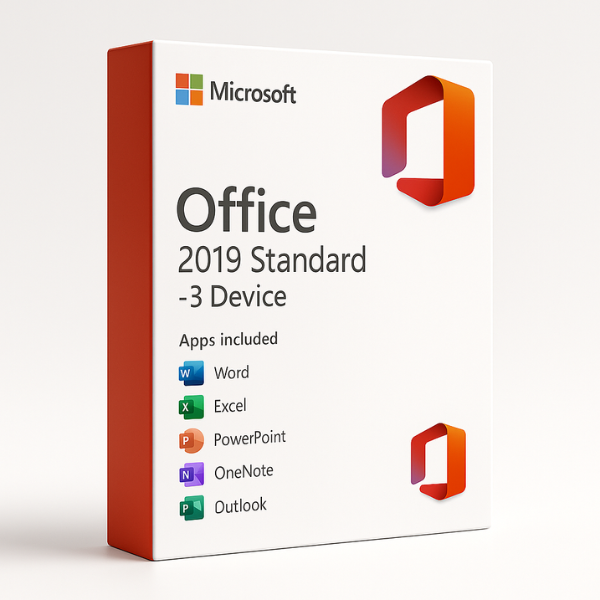
Introduction to Microsoft Office 2019 Standard – 3 Device
Are you looking for a reliable, cost-effective office suite that can be used on multiple devices? Microsoft Office 2019 Standard – 3 Device is an excellent solution for individuals, small businesses, and families who need access to essential office tools on up to three devices. This version offers a one-time purchase with lifetime access, making it a solid investment for those who prefer a non-subscription model.
In this guide, we’ll explore the features, benefits, installation process, and pricing of Microsoft Office 2019 Standard – 3 Device. Additionally, we’ll explain why SoftLicenseKey.com is the best place to purchase this version at the cheapest prices available online.
What is Microsoft Office 2019 Standard – 3 Device?
Microsoft Office 2019 Standard – 3 Device is a comprehensive productivity suite that includes essential Office applications like Word, Excel, PowerPoint, Outlook, and OneNote. This version allows you to install the software on up to three devices, providing flexibility for users who work across different platforms, whether it’s a Windows PC, Mac, or a tablet.
Unlike Microsoft 365, which operates on a subscription basis, Office 2019 Standard is a one-time purchase, offering lifetime access without any recurring fees. This makes it a great choice for users who need access to the basic Office tools and don’t require the constant updates or cloud storage options offered by Microsoft 365.
Key Features of Microsoft Office 2019 Standard – 3 Device
-
Word 2019: Create, edit, and format professional documents with ease. New features like Focus Mode and Improved Search help streamline the writing process.
-
Excel 2019: Manage and analyze data efficiently with new features such as Power Query, PowerPivot, and new chart types for advanced data analysis.
-
PowerPoint 2019: Design stunning presentations with advanced animations, 3D models, and new design ideas to captivate your audience.
-
Outlook 2019: Stay organized with improved email management, calendar syncing, and task organization.
-
OneNote 2019: Take and organize notes easily, with seamless syncing across devices for access anywhere.
Why Choose Microsoft Office 2019 Standard – 3 Device?
One-Time Purchase with Lifetime Access
One of the biggest advantages of Office 2019 Standard – 3 Device is that it’s a one-time purchase, offering lifetime access to the software. Unlike subscription-based models like Microsoft 365, you don’t need to worry about recurring fees. This can be especially appealing for individuals or small businesses that need to keep costs down and avoid monthly or yearly charges.
Ideal for Small Businesses and Personal Use
Microsoft Office 2019 Standard – 3 Device is perfect for small businesses and home users who need reliable and powerful tools for document creation, data management, and communication. The ability to install the software on up to three devices means that you can easily manage tasks on multiple platforms without purchasing separate licenses.
Affordable and Flexible Solution for Multiple Devices
The 3-device license makes it an ideal solution for families or small businesses that want to provide access to the core Office applications on several devices. It gives you the flexibility to work from your desktop, laptop, or even mobile devices, ensuring you’re always productive, no matter where you are.
Convenient Setup for Home Offices
For home office users, the 3-device license offers an affordable way to equip multiple computers or devices with all the productivity tools you need. Whether you’re working on a document in Word, analyzing data in Excel, or managing emails with Outlook, you can do it all from different devices without any restrictions.
Benefits of Microsoft Office 2019 Standard – 3 Device
Access to Core Office Applications
With Microsoft Office 2019 Standard – 3 Device, you gain access to the essential tools for productivity, including Word, Excel, PowerPoint, and Outlook. These applications are designed for businesses and individuals who need to create documents, manage data, organize tasks, and communicate efficiently.
Installation on Multiple Devices with Ease
One of the standout features of Office 2019 Standard – 3 Device is the ability to install the software on up to three devices. Whether you need to install it on your PC, Mac, or tablet, this version allows you to stay productive on all your devices, with no additional licenses required.
Seamless Syncing Across Devices
Once installed, your documents and settings can be synced across multiple devices, ensuring that you can pick up right where you left off—whether you’re using your desktop at home or your laptop at the office.
Enhanced Productivity and Collaboration Tools
Although Office 2019 is not subscription-based, it still provides excellent collaboration features, such as real-time co-authoring in Word and Excel. You can also store your documents in OneDrive for cloud access, making it easier to share files and collaborate with others.
System Requirements for Microsoft Office 2019 Standard – 3 Device
Minimum System Requirements
Before installing Office 2019 Standard – 3 Device, ensure that your device meets the following minimum system requirements:
-
Operating System: Windows 10 or later, macOS 10.14 or later
-
Processor: 1.6 GHz or faster, two-core processor
-
RAM: 4 GB or more
-
Storage: 4 GB available disk space
-
Display: 1280 x 768 screen resolution
Recommended System Requirements
To ensure the best experience, it’s recommended that your system meets the following specifications:
-
Operating System: Windows 10 or later, macOS 10.14 or later
-
Processor: 2 GHz or faster, quad-core processor
-
RAM: 8 GB or more
-
Storage: 4 GB or more available space
-
Display: 1920 x 1080 resolution or higher
How to Get Microsoft Office 2019 Standard – 3 Device at the Best Price
Why SoftLicenseKey.com Offers the Cheapest Prices
At SoftLicenseKey.com, we provide genuine Microsoft Office software at the lowest prices on the market. Our platform offers Microsoft Office 2019 Standard – 3 Device at an affordable rate, ensuring that you can access all the features of Office without breaking the bank.
Exclusive Discounts and Special Offers
We regularly offer discounts, flash sales, and exclusive promotions to help our customers get the best deal on Microsoft Office. Be sure to check our website for the latest offers!
Instant Product Key Delivery
When you purchase from SoftLicenseKey.com, you’ll receive your product key instantly via email. This ensures that you can start the installation and activation process right away, with no delays.
How to Purchase from SoftLicenseKey.com
-
Visit SoftLicenseKey.com and navigate to the Microsoft Office 2019 Standard – 3 Device product page.
-
Add the product to your cart and proceed to checkout.
-
After completing your purchase, you’ll receive your product key instantly via email.
-
Download Office 2019 and use the key to activate the software on your devices.
How to Install Microsoft Office 2019 Standard – 3 Device
Step-by-Step Installation Process
-
Download the Installer: Go to SoftLicenseKey.com to download the Office 2019 Standard installer.
-
Run the Installer: Open the downloaded file and follow the on-screen instructions to install the software.
-
Activate Using the Product Key: When prompted, enter the product key to complete the activation process.
-
Start Using Office: Once activated, you can start using Word, Excel, PowerPoint, Outlook, and other Office apps.
Troubleshooting Common Installation Issues
-
Error 0x4004F00C: This error often occurs when there are network issues during installation. Try restarting your internet connection or reinstalling the software.
-
Activation Failures: Ensure you’ve entered the correct product key and that your system meets the minimum requirements for installation.
Why SoftLicenseKey.com is the Best Place to Buy Microsoft Office 2019 Standard – 3 Device
Trusted by Thousands of Satisfied Customers
At SoftLicenseKey.com, we are trusted by thousands of customers for delivering genuine Microsoft Office products at unbeatable prices. Our customer-centric approach ensures a hassle-free shopping experience every time.
Secure and Reliable Transactions
We offer secure payment options and guarantee that your Microsoft Office product is authentic and activated correctly.
Excellent Customer Support and Fast Delivery
Our dedicated support team is always ready to assist you with installation, activation, or any other queries. We offer instant product key delivery for your convenience.
Conclusion
Microsoft Office 2019 Standard – 3 Device is the perfect solution for home users, small businesses, and families who need a reliable, cost-effective productivity suite. With access to all the essential Office apps and the ability to install it on three devices, it provides excellent value for money. When you purchase from SoftLicenseKey.com, you get genuine software, instant delivery, and the cheapest prices.
Frequently Asked Questions (FAQs)
-
Can I install Microsoft Office 2019 Standard on more than three devices?
No, the 3-device license is limited to three installations. -
Is Microsoft Office 2019 Standard compatible with Mac?
Yes, Office 2019 is compatible with both Windows and Mac operating systems. -
What is the difference between Office 2019 Standard and Office 2019 Professional?
The Professional version includes additional apps like Publisher and Access. -
How do I activate Office 2019 Standard with the product key?
Enter the product key during the installation process to activate Office 2019 on your devices. -
Is SoftLicenseKey.com a trustworthy site for buying Microsoft Office?
Yes, SoftLicenseKey.com is a reputable site known for providing genuine Microsoft Office products and excellent customer support.
Related products


